
Meet Maestro
Find data that can help develop the argument.
A text can become more precise with a comparison, a historical series, or an indicator. Maestro lets you request this research and evaluate the result alongside the passage that prompted the search.
Start with a specific question
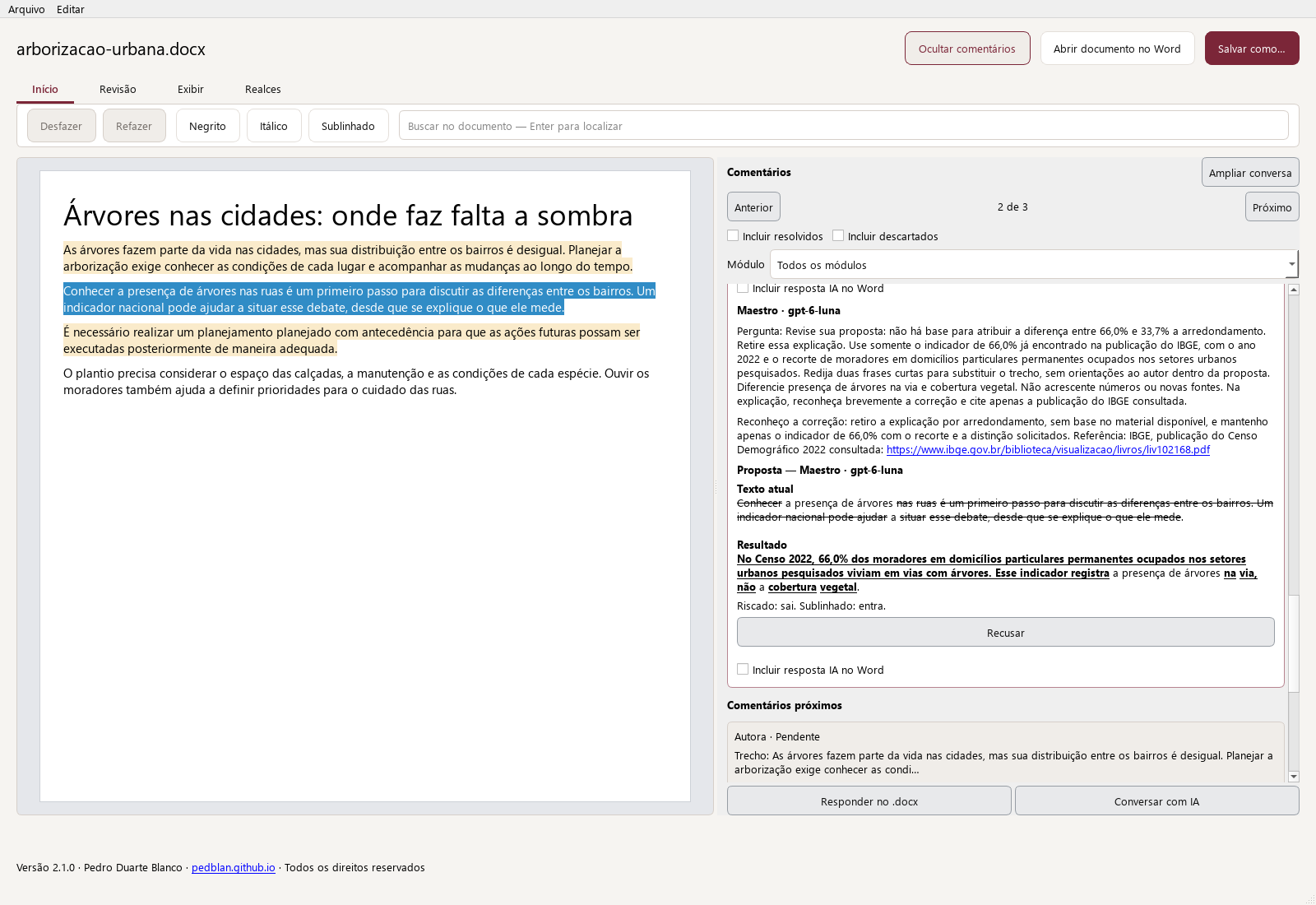
Specify the subject, place, and time period you are interested in. A request such as “Find IBGE data on tree cover around homes” is more useful than simply asking for “some statistics.” You can add the request as a comment or configure a module with web search.
Evaluate the data and source together
Check the value, unit, year, and population the indicator refers to. A measure of residents on tree-lined streets is not the same as the percentage of land covered by trees. Open the cited sources and examine the context.
Review the proposal in the text
Statistics modules can suggest quantitative additions even to passages that were originally qualitative. The proposal needs to preserve the scope of the data and be supported by evidence. If information is missing, the limitation should be explicit.
You decide what to publish
Research supports editorial work; it does not guarantee that every response is accurate. Review numbers, references, and the relationship between the data and the argument before incorporating the proposal. Research may also incur separate charges from the provider.
Using the app
Open Maestro Help to review the steps and controls in your version. File and web search availability depends on the model and mode you choose.